ClipMagic - Windows Clipboard Manager
Do you CTRL-C? Then you need ClipMagic!
Speed up your work with ClipMagic. ClipMagic monitors the Windows Clipboard saving everything you copy, keeping it safe for when you need it, and makes it easy to access your clips quickly whatever application you are working in. Whereas the Windows Clipboard can only store one item at a time - leading to duplication of effort and the need to constantly switch back and forth between windows - ClipMagic stores and categorizes an unlimited number of clips.
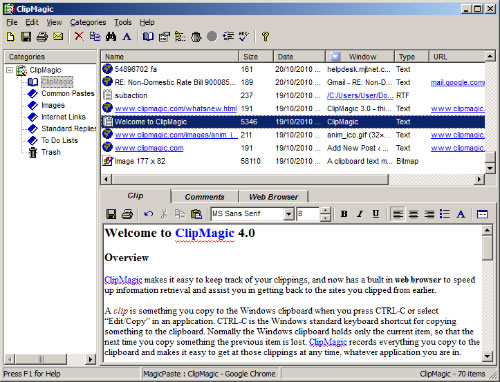
Benefits of ClipMagic Windows Clipboard Extender
- Speed up your work - stop switching back and forth between documents.
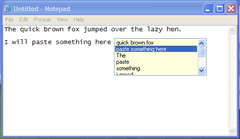
- Speed up Copy and Paste with ClipMagic's PastePicker
 , MagicPaste and Hotkeys .
 - Stop recopying items to the clipboard that you've already copied earlier.
- Unlike the Windows Clipboard ClipMagic stores unlimited items.
- Categorise/Organise your clips. Create rules/filters for incoming clips.
- Assign often used text like email signatures and boilerplate replies to hotkeys.
- Quickly access the source web page of internet clips.
- Store/Categorise your ideas and research fast.
See How ClipMagic Can Help You?

ClipMagic 4 works perfectly on all versions of Windows from XP onwards
I have used ClipMagic now for three years and it is fantastic. It does everything it says it does and makes life so much easier. David Walker, October 2010
I recently downloaded your trial version of ClipMagic [Windows ClipBoard Viewer], and I LOVE IT!!! ...[more]
I have used a variety of clip board enhancers over the years – none had all the facilities which I need. Fortunately, I recently came across ClipMagic 4.0, which soon became my preferred clip utility ...[more]
What can you use this Clipboard Viewer for?
There are numerous situations where our clipboard software could help save time and avoid the need for jotting things down on scraps of paper or opening an application to save something into. ClipMagic is simple to use, automatic and can be customised to suit your needs.
- Storing of text clips from any application for reading later or pasting into other applications.
- Creating a database of images in any format for later viewing or transferring to an image editor.
- Cruising the internet to store clips of text and automatically record the URL so that you can quickly revisit the site at a later date.
- Jotting down thoughts or ideas quickly so that you can refer to them later or add them into a document.
- Sorting or organising saved text and image clips into categories either automatically or manually.
- Quickly copy a saved clip into any application using Hot Keys or PastePicker to save time, especially for repetitive tasks.
- Perform automatic string replacements on copied text using Regular Expressions